Yes, there is way we can define or modify our launch.json file in such a way that before publishing any custom app it ask me to the right environment to publish.
See below
Open the lanuch.json file from your app file.
Put the new configuration schema as many environment you have like I do.
In my case I do have two environment
<b>1. Dev_Sandbox</b>
<b>2. Test_Sandbox</b>
<div class="separator"><img class=" wp-image-225 aligncenter" src="https://www.navwithnav.com/wp-content/uploads/2022/09/image-1-300x185.png" alt="" width="509" height="314" /></div>
Save it and try to Publish or Download the symbol
So I am trying to download the symbol, as soon as you hit that command Command line will start show you which environment you want to choose so that you can download the symbol in same.
The same sandbox name we defined earlier start flowing here.
<div class="separator"><a href="https://blogger.googleusercontent.com/img/a/AVvXsEiJdQP8R8oqYc0z8L8bqAp2xHkXgPijgeDNAizp_pZvXZK5WsfkL0Zi6x9kK37WiwUX09ex6qbxG1V_D1fWQznCvN__U2itFOIacClyhbNSwO_amDnnODYbSFICNSIsxjiH9FsOU1tJlhGpzj6HQMxptNHmeHVV_rxvIu2fBGU6Ccw6P04Br2sV0OTs-g"><img class=" wp-image-226 aligncenter" src="https://www.navwithnav.com/wp-content/uploads/2022/09/image-1-1-300x77.png" alt="" width="522" height="134" /></a></div>
Choose the one and enjoy :)
Back to Series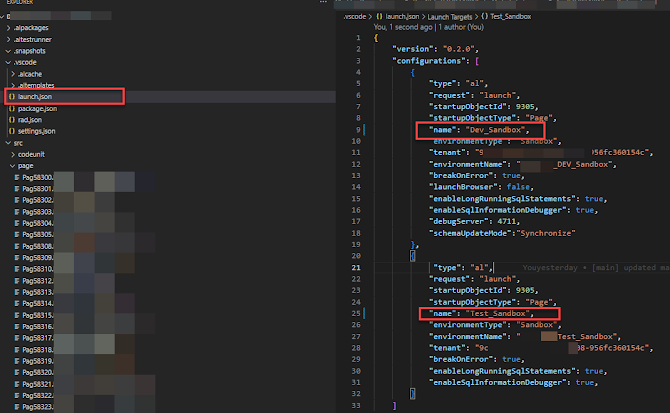
Uncategorized
Can we choose the right environment before Publishing the BC App?
Yes, there is way we can define or modify our launch.json file in such a way that before publishing any custom app it ask me to the right environment to publish. See below Open the lanuch.json f...
NitinSeptember 23, 2022 1 min read
Business CentralAL ProgrammingExtensionsDeployment
Share this Article
0
0
Discussion (0)
No comments yet. Be the first to share your thoughts!
Newsletter
Stay updated with the latest Business Central development tips.

Nitin Verma
Solution Architect
Extensive experience specializing in Microsoft Dynamics NAV, Business Central, Power Platform, and ERP Architecture.
Read full bioSearch Articles
Monthly Archive
Loading...