Generally we see 2 common warning raise when we compile the AL App.
<pre class="EnlighterJSRAW" data-enlighter-language="generic">warning AL0604: Use of implicit 'with' will be removed in the future
AL0606: "The 'with' statement is deprecated and will be removed for cloud development in a future release. This warning will become an error in a future release."</pre>
<strong><span style="color: #3366ff;">1st warning <a style="color: #3366ff;" href="https://learn.microsoft.com/en-us/dynamics365/business-central/dev-itpro/developer/diagnostics/diagnostic-al604" target="_blank" rel="noopener">AL0604</a></span></strong>
<strong><span style="color: #3366ff;">2nd warning <a style="color: #3366ff;" href="https://learn.microsoft.com/en-us/dynamics365/business-central/dev-itpro/developer/diagnostics/diagnostic-al606" target="_blank" rel="noopener">AL0606</a></span></strong>
I am sure most of the developer faced above those warnings
Now the question is can we ignore those? Answer is <strong>YES</strong>
Just add <strong>suppressWarnings</strong> property in <strong>app.json </strong>file and you will find there are the warning which can be used here so that it does not raise any warning any more.
<em>Read the official document from here: </em><span style="color: #0000ff;"><strong><a style="color: #0000ff;" href="https://learn.microsoft.com/en-us/dynamics365-release-plan/2020wave2/smb/dynamics365-business-central/suppress-al-warnings" target="_blank" rel="noopener"><em>Read Here</em></a></strong></span>
<img class="alignnone size-full wp-image-372" src="https://www.navwithnav.com/wp-content/uploads/2022/10/2022-10-05_18-46-04.png" alt="" width="249" height="267" />
<div>
<pre class="EnlighterJSRAW" data-enlighter-language="generic">"suppressWarnings": [ "AL0604", "AL0106" ],
"features": ["NoImplicitWith"],</pre>
<div>
<div></div>
</div>
Now from the Business Central 2022 Wave 2 you can use <strong>Implicit and Explicit use of 'With'</strong> which can be switch OFF or ON
</div>
<img class="alignnone size-medium wp-image-373" src="https://www.navwithnav.com/wp-content/uploads/2022/10/2022-10-05_18-54-19-300x91.png" alt="" width="300" height="91" />
You can also use the Pragama for temporary basis not to use this<a href="https://learn.microsoft.com/en-us/dynamics365/business-central/dev-itpro/developer/directives/devenv-directive-pragma-implicitwith" target="_blank" rel="noopener"><strong> Read Here</strong></a>
Back to Series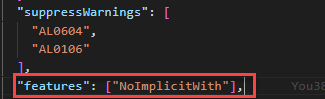
Uncategorized
Can we ignore warning AL0604 and AL0606 when compiling the AL APP?
Generally we see 2 common warning raise when we compile the AL App. <pre class="EnlighterJSRAW" data-enlighter-language="generic">warning AL0604: Use of implicit 'with' will be removed in the future ...
NitinOctober 5, 2022 2 min read
Business CentralRelease WaveNew FeaturesMicrosoft
Share this Article
0
0
Discussion (0)
No comments yet. Be the first to share your thoughts!
Newsletter
Stay updated with the latest Business Central development tips.

Nitin Verma
Solution Architect
Extensive experience specializing in Microsoft Dynamics NAV, Business Central, Power Platform, and ERP Architecture.
Read full bioSearch Articles
Monthly Archive
Loading...