NavWithNav

The premier knowledge-sharing hub for Microsoft Dynamics 365 Business Central developers, architects, and ERP professionals.

Back to Series
Uncategorized

Using Microsoft Translations in VS AL Code

<h1 class="entry-title">SHOW MICROSOFT TRANSLATIONS IN VS CODE</h1> <div>his post is especially interesting for the people whose native language is not English. Do you know the feeling? You are looki...

NitinSeptember 23, 2022 1 min read
Business CentralTranslationsAL ProgrammingMultilanguage
Using Microsoft Translations in VS AL Code

SHOW MICROSOFT TRANSLATIONS IN VS CODE

his post is especially interesting for the people whose native language is not English. Do you know the feeling? You are looking at the source code of some .al object and you come across a field name that means absolutely nothing to you. It would be helpful for you if you could see the translation of this field name into your native language. Often this is already sufficient. In the old C/SIDE client we had the field “Caption” in the table designer to see the translation.

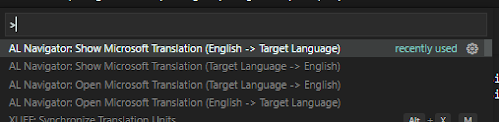
AL NAVIGATOR: OPEN/SHOW MICROSOFT TRANSLATION
0
0

Discussion (0)

Leave a comment

No comments yet. Be the first to share your thoughts!

Newsletter

Stay updated with the latest Business Central development tips.

Nitin Verma

Nitin Verma

Solution Architect

Extensive experience specializing in Microsoft Dynamics NAV, Business Central, Power Platform, and ERP Architecture.

Read full bio

Search Articles

Monthly Archive

Loading...

Visitor Stats